Multilingual storefronts: one brand, any language your market needs
Run your travel storefront in Arabic, French, Spanish and more on one brand and domain. AI drafts translations, your team approves, English fills any gaps.
Run your travel storefront in Arabic, French, Spanish or any language your market needs, on one brand and one domain. AI drafts the translations, your team approves them, and English covers anything not translated yet.
By Traviology · Published 2026-11-21
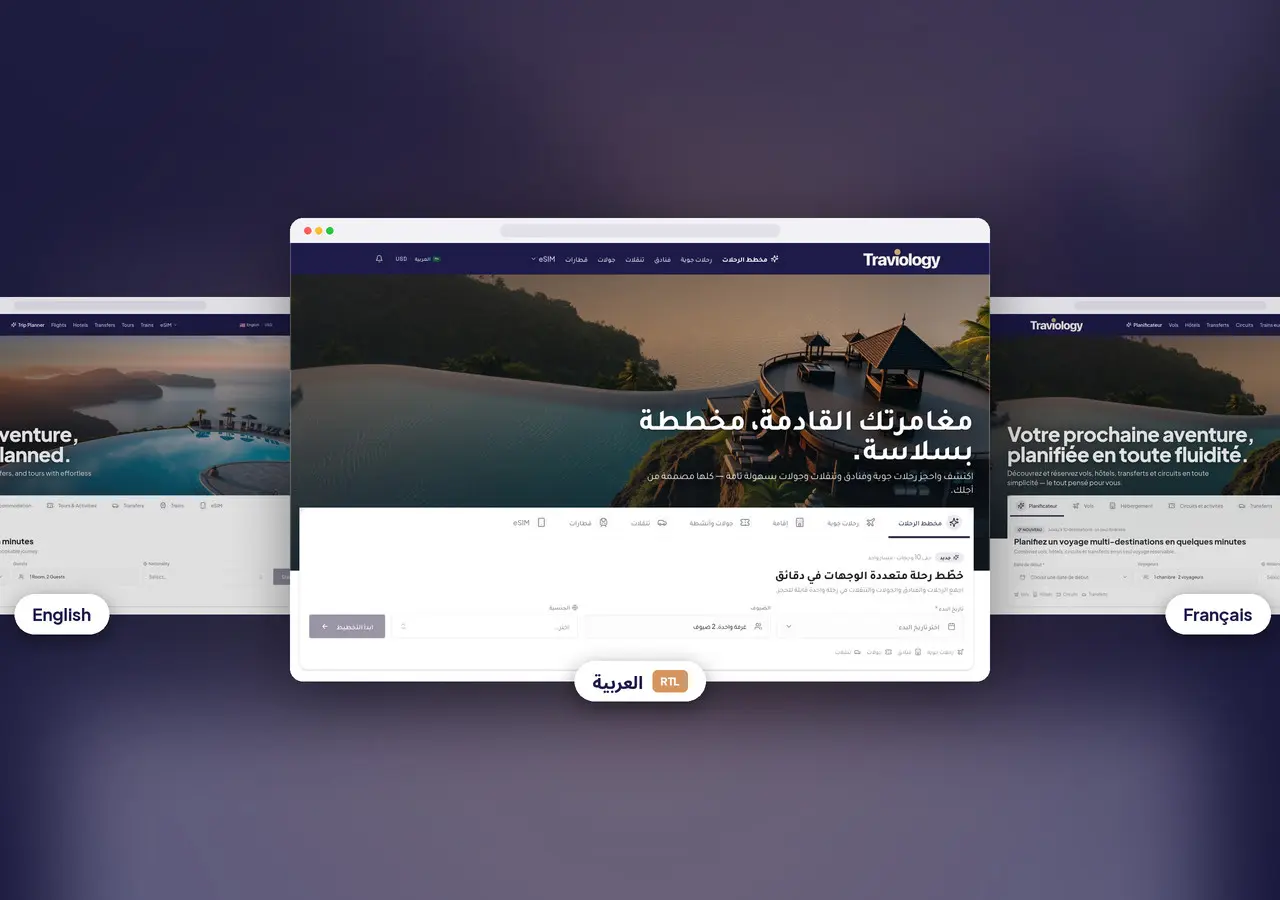
Most white-label travel sites launch in one language. That stops working when your social ads land in Madrid, your client groups mix Arabic and English, and your Jordan DMC needs French for inbound tour operators while the Gulf office wants Arabic that reads properly from right to left.
Traviology storefronts are built for that. You keep one brand, one domain and one checkout. You switch on the languages your markets need, your team translates and reviews at its own pace, and English quietly covers anything not translated yet. Nothing reaches travelers just because a machine produced it. A person on your team decides what goes live.
What changes on your site
English stays the default on clean addresses such as /trip-planner or /jordan/amman/hotels. Each extra language you publish gets a short prefix on your own domain: /ar/trip-planner, /es/jordan, /fr/trip-planner. The rest of the address stays in English, so links you have already shared keep working while you translate menus, buttons and marketing copy.
Travelers choose their language from a switcher in your header, on your domain, not from a third-party widget. Changing language does not change their currency. Right-to-left languages such as Arabic get a mirrored layout, text that handles mixed scripts correctly, and language names written in their own script in the switcher. You can also set brand fonts for each direction. French, Spanish, Italian and other left-to-right languages sit right beside them, with no second site and no separate theme to maintain.
What you control
All of this lives in the Languages area of your Traviology console:
Pick any language in the catalog. Turn on one language this week and three more next quarter. You are not stuck with a short preset list.
Translate the booking screens. Search, the trip planner, checkout and traveler accounts come with ready platform translations for each supported language. Change any wording to match your brand, preview it, and restore the default whenever you like.
Translate your own content. Homepage sections, menus, legal pages, trip ideas and inspiration cards each get their own draft per language. When you publish, the translated version appears on the prefixed address straight away. No developer, no rebuild.
Start from templates if you want. Starter content can prefill drafts for things like trip ideas or homepage blocks. It never publishes on its own.
Keep money in safe hands. Anything that touches price or payment rules stays in English on purpose, so a translation can never change what a traveler pays or agrees to.
AI drafts, your editors publish
Translation is split between speed and control. From your English content, AI can propose a draft in any language you have enabled, right to left or left to right. Your editors then check tone, legal wording and destination names, and only what they approve goes live.
The goal is not to push raw machine translation at paying travelers. It is to give your fluent staff a head start, so their time goes on judgment calls instead of retyping button labels.
What travelers see when something is missing
If a phrase has no French version yet, the storefront shows the English one. Menus, page titles and checkout steps never go blank. A language you switch on early can never break the booking path. It is a safety net, not a reason to skip review.
For homepage sections, the console shows whether a block still uses the standard Traviology wording, which is already translated for you, or whether you changed it in English and now need your own translation. Translate only what your brand actually changed.
One honest note: booking emails, vouchers and invoices stay in English for now, and hotel and room names appear as suppliers provide them.
Search and your languages
Each language lives at its own stable address on your domain, so /ar/jordan and /jordan are clearly the same page in two languages, not two thin copies of your site. The Traviology marketing site stays in English. Your storefront domain is where your travelers meet your brand in their own language.
A practical rollout
Pick two languages that matter commercially, for example Arabic and English, or French and English for a European leisure brand.
Switch them on in the Languages area and check that the switcher shows up on your staging site.
Review the busiest screens first: trip planner, hotel search, traveler details at checkout and the confirmation page.
Translate your homepage hero and main menu so first impressions match the language of your ads.
Translate the trip ideas and inspiration cards your marketing already promotes.
Test right-to-left pages on real phones. Date pickers, multi-step forms and sticky headers are where layout issues tend to hide.
Go live one language at a time, with English live the whole way.
See it on a live storefront
Our demo storefront shows several published languages on a real brand site, Arabic right to left beside European languages and English. Open try.traviology.com and use the language switcher in the header. For a short tour with an interactive preview, see Languages on our platform page.
Who this is for
Destination management companies selling to mixed-language groups. Leisure agencies running ads in their target markets. Tour operators giving sub-agents abroad a branded storefront. Consolidators who want one system underneath and local-language trust on the surface.
If your next rebrand plan involves a separate website for every country, start here instead: one Traviology storefront, a prefix per language, the same inventory and back office, and translated screens where they earn you bookings.
Next step
Want to see a language go from switched on to published, on your own brand? Book a demo and tell us which languages and markets you want first. Khaled and the team will map them to the catalog and suggest a sensible order for your content.
See it on your brand
Flights, hotels, trains, transfers, and tours, sold under your name. One short walkthrough, then you decide.